The best mobile video editing apps in 2026
There is no single best video editor for a phone — there is a best one for the kind of video you make. We compared nine against their own App Store listings and help pages: what each is best for, what it costs, when it adds a watermark and whether auto captions are included. If you'd rather not pay anything, the best free options have their own section.
TL;DR
- Best for talking-head videos and creators who don't want to edit: BRoll King (our app). It proposes every cut, plans the B-roll, adds zooms and captions, and renders on your iPhone. Not free: you start with 250 free credits for your first 30 days, no card needed, then plans start at $19 a month. Not on the App Store yet.
- Best free editor: Adobe Premiere. Unlimited 4K exports with no watermark, free auto captions, unlimited tracks; you pay only for generative AI.
- Best for templates and effects: CapCut. No watermark on normal exports, but Pro items or a template's end clip can add one, and paid plans vary by region.
- Best for Instagram: Edits — free, no watermark, and free, unlimited captions. VN is the other free, watermark-free pick, with free on-device captions.
- Best one-time purchase: LumaFusion ($29.99), with multitrack and multicam editing.
- Simplest: iMovie — free with no in-app purchases, but Apple lists no automatic captions and it hasn't been updated since December 2024.
In this article
How we picked them
"Best" depends on what you make, so instead of one ranking, each app below is labelled with what it does best. For each one we looked at:
- What it's best for — the kind of video it makes easiest.
- What it costs — the free tier, if there is one, and the paid options on the US App Store.
- Watermarks — only what the developer itself says; we didn't count claims from third-party sites.
- Auto captions — whether they exist and whether they are free.
- Where else it runs — Android, desktop or web, for when a project outgrows the phone.
Everything below was checked against the developers' own pages and App Store listings on September 29, 2026; the sources are listed at the end. Prices and features change often, so check before you commit. BRoll King is our app: we list it first, label it for the one job it's built for, and say who should pick something else.

The best mobile video editing apps at a glance
| App | Best for | Price | Watermark (per the developer) | Auto captions | Also runs on |
|---|---|---|---|---|---|
| BRoll King (ours) | Talking-head videos, edited for you | 250 free credits for your first 30 days, no card needed; plans start at $19/month. Not on the App Store yet | None | Yes, with an AI review of names and brands | iPhone only; web app in development |
| Adobe Premiere | A full editor for free | Free; optional Premiere Mobile plan for generative AI ($7.99/month) | None | Yes, free and unlimited | Android, iPad |
| CapCut | Templates, effects and trends | Free; Standard $9.99/month, Pro $19.99/month in the US (varies by region) | None on normal exports; Pro items or a template end clip add one | Yes; CapCut's pages disagree on which plans include them | Android, iPad, Windows, Mac, web |
| Edits | Instagram Reels | Free, no in-app purchases listed | None | Yes, free and unlimited | Android |
| VN | Learning a real timeline for free | Free; optional VN Pro | None | Yes; on-device models free, cloud captions use credits | Android, Mac, Windows |
| InShot | Quick social edits | Free with ads; Pro $4.99/month, $19.99/year or $49.99 once | Not stated | Listed; free or Pro not stated | Android |
| iMovie | The simplest edits | Free, no in-app purchases | Not stated | None listed (titles only) | iPad, Mac (send projects) |
| YouTube Create | YouTube and Shorts | Free | Not stated | Yes, one tap, in selected languages | Android |
The best mobile video editing apps, one by one
BRoll King (ours): best for talking-head videos and creators who don't want to edit
Most of the time in a talking-head edit goes into the same mechanical jobs: finding pauses and false starts, deciding which take to keep, looking for B-roll that matches each sentence, adding zooms and fixing captions. Some editors now automate a piece of that — InShot's AI Cut removes silence and filler words, for example — but you still assemble the rest by hand. BRoll King is an iPhone app that takes on the whole chain and shows you each step to approve.
- Cuts, with reasons. Pick a recording and it proposes every cut — silences, filler words, restarted sentences, lines said twice and off-script asides — each with a reason, and you switch off anything you want to keep. An AI retake review (on by default, 3 credits a minute, 10 minimum) also catches retakes you reworded.
- B-roll planned from your words. The transcript drives a plan of what to show and when: stock photos and footage from Pexels, AI images, AI video, motion graphics or your own clips, with the credit cost shown before anything is made.
- Zooms and captions. Face-aware punch-ins and push-ins, which cost no credits, and captions built from a premium transcript, with an AI review that fixes misheard names and brands.
- Rendered on your phone. The video is composited and exported on the iPhone, at its own resolution and frame rate; only the audio is uploaded, for transcription. BRoll King doesn't add a watermark.
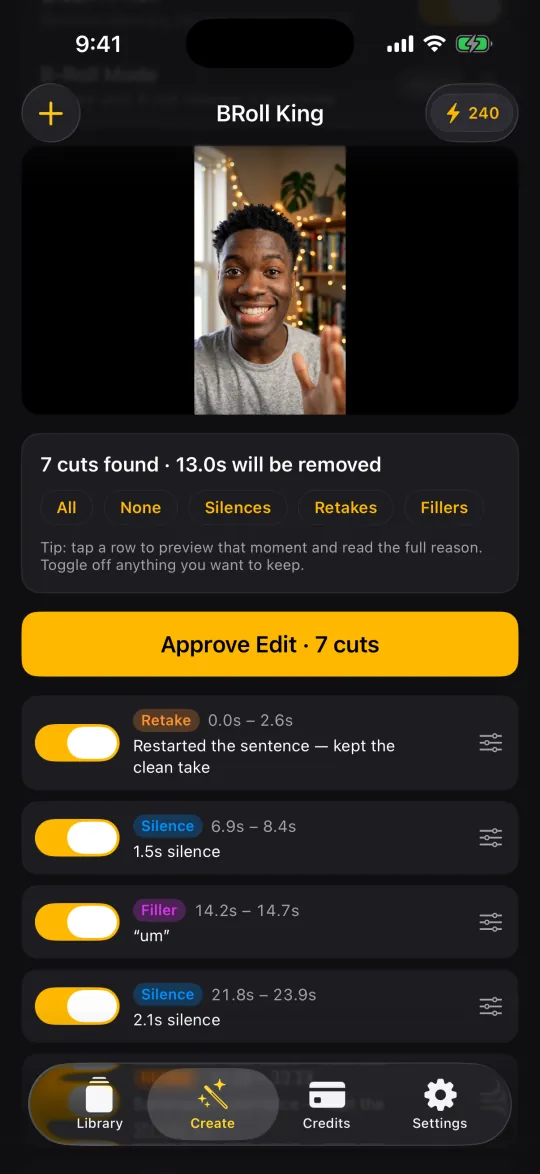
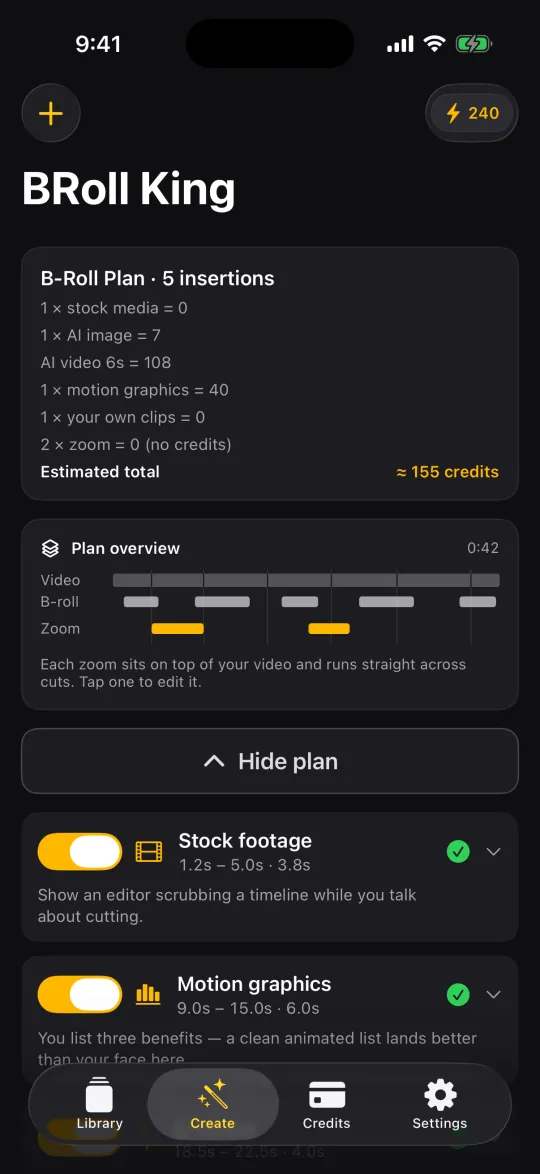
Price: it isn't free. When it launches you can start with 250 free credits for your first 30 days, no card needed. After that, Starter $19/month (750 credits), Pro $39/month (1,600 credits) and Power $99/month (4,000 credits), or about 30% less on yearly plans. A three-minute video with stock B-roll (3 stock photos and 1 stock clip) costs about 91 credits with the default settings. BRoll King isn't on the App Store yet; you can get an email the day it launches.
Good for: creators, coaches, educators and founders who film themselves talking and would rather review an edit than build one. Pick something else if you want templates and effects (it has none), need Android or a computer (it's iPhone-only for now; a web app is in development), want a free editor, or need an app you can download today.
Adobe Premiere: best free editor
Adobe launched Premiere on iPhone in September 2025, and it reached Android in September 2026. Adobe says the free version exports an unlimited number of 4K videos with no watermark, and the app includes free, unlimited auto captions and a timeline with unlimited tracks and keyframes. What you pay for is generative AI, through a Premiere Mobile plan ($7.99 a month or $69.99 a year on the US App Store) or most Creative Cloud plans.
Good for: anyone who wants a real multi-track editor for free. Keep in mind: if you used Premiere Rush, it's gone: Adobe pulled it from app stores on September 30, 2025, ended it on September 30, 2026, and replaced it with Premiere on iPhone and desktop.
CapCut: best for templates, effects and trends
CapCut is free to download on the US App Store; it went offline in the US with TikTok in January 2025 and returned to the app stores in February 2025. Its strengths are a large library of templates and effects, a multi-track timeline with keyframes, speed curves and chroma key, built-in AI video generation, and versions for Android, Windows, Mac and the web. Normal exports have no watermark; a template's ending clip adds one (you can remove it), and projects that use Pro items export with a watermark on the free plan. On the US App Store, Standard is $9.99 a month and Pro $19.99 a month, and CapCut says prices vary by region, device and promotion.
Good for: trend-driven TikToks and Reels, and anyone who edits on a phone and a computer. We compare it with BRoll King for talking-head videos in CapCut alternative for iPhone.
Edits: best for Instagram Reels
Meta launched Edits in April 2025 as a free app for iPhone and Android; you sign in with Instagram. It exports in up to 4K with no watermark, and Meta describes its auto captions as free, unlimited and customizable. It also has green screen, keyframes, a teleprompter and templates. Meta has announced a paid "Edits Plus" with more storage, without a price yet, and says the core app stays free.
Good for: Reels creators who want a capable editor with nothing to pay.
VN: best free app for learning a real timeline
VN describes itself as pro-level editing with no watermarks, for free, and runs on iPhone, Android, Mac and Windows. It has a multi-track timeline, keyframes and chroma key, and its App Store listing says it exports up to 4K at 60 fps. Auto captions are free when they run on the phone (VN's Tiny and Base models); cloud captioning uses paid credits. VN Pro is an optional upgrade.
Good for: people who want to learn a real timeline without paying.
LumaFusion: best one-time purchase
If you'd rather pay once than subscribe, LumaFusion is a one-time $29.99 purchase with six video/audio tracks plus six audio tracks (up to 24 with its Creator Pass on iOS), multicam editing and support for editing straight from USB-C drives.
Good for: people who have outgrown the free editors and want traditional multitrack editing for a one-time price.
InShot: best for quick social edits
InShot is free to download, shows ads, and sells InShot Pro for $4.99 a month, $19.99 a year or $49.99 once. Its App Store listing includes auto captions, keyframes, chroma key, 4K export at 60 fps and an "AI Cut" that removes silence, filler words and breath sounds. InShot's listing doesn't say which of these need Pro.
Good for: quick edits for social posts, especially if you'll pay a few dollars to go ad-free.
iMovie: the simplest, but standing still
Apple's iMovie is free with no in-app purchases, saves up to 4K at 60 fps (with an HDR option) and includes Magic Movie, 20 Storyboards and trailer templates. You can send projects to iMovie or Final Cut Pro on a Mac. Two caveats: Apple's iMovie guide covers titles but no automatic captions, and the latest App Store update is version 3.0.5 from December 2024.
Good for: family videos and first edits.
YouTube Create: best for YouTube and Shorts
Google's YouTube Create is free on iPhone (iPhone XR or later, iOS 17 or later) and Android. It adds captions in one tap in selected languages and exports up to 4K at 60 fps.
Good for: YouTube and Shorts creators who want a simple, free editor.
The best free mobile video editing apps
If you don't want to pay anything, these are the best free options, going by what their developers say:
- Most generous free tier: Adobe Premiere. Unlimited 4K exports with no watermark, free and unlimited auto captions and unlimited tracks; you pay only for generative AI.
- Free with no watermark: VN, with free on-device captions, and Edits, Instagram's editor, with free, unlimited captions.
- Free for YouTube: YouTube Create, with one-tap captions in selected languages.
- Simplest: iMovie — free with no in-app purchases, but with no automatic captions listed and no update since December 2024.
- Free, with conditions: CapCut (Pro items or a template's end clip can add a watermark, and paid plans vary by region) and InShot (free with ads; its listing doesn't say which features need Pro).
LumaFusion and BRoll King aren't free. LumaFusion is a one-time purchase; BRoll King starts you with 250 free credits for your first 30 days, no card needed, and plans start at $19 a month after that.
Which app should you pick?
- You film yourself talking and don't want to edit: BRoll King (ours). It proposes the cuts, the B-roll, the zooms and the captions, and you approve them.
- The most editing power for free: Adobe Premiere or VN.
- Trend-driven TikToks and Reels: CapCut for its templates and effects, or Edits if you post mainly to Instagram.
- Pay once, not every month: LumaFusion.
- The simplest possible app: iMovie.
- Phone and computer: CapCut or VN, which also have desktop versions.
You can also combine them. BRoll King saves a normal video file to your Photos library, so you can clean up and illustrate a video there, then add effects in CapCut or any other editor.
FAQ
What is the best mobile video editing app?
It depends on what you make. Adobe Premiere has the most generous free tier (unlimited 4K exports with no watermark, free auto captions). CapCut is best for templates and effects, Edits for Instagram Reels, and LumaFusion if you would rather pay once. For talking-head videos where you want the cuts, B-roll, zooms and captions done for you, BRoll King (our app) is built for that job, though it isn't free.
What is the best free video editing app for iPhone?
Adobe Premiere has the most generous free tier: unlimited 4K exports with no watermark and free, unlimited auto captions. VN and Edits are also free with no watermark, and iMovie is the simplest. CapCut is free to download, but Pro items or a template's end clip can add a watermark.
Which free video editors have no watermark?
According to their developers: Adobe Premiere, VN and Edits export without a watermark on the free tier. CapCut has no watermark on normal exports, but a template's end clip or Pro items in a project can add one. InShot, iMovie and YouTube Create don't address watermarks on their own pages, so we haven't listed them either way.
Is BRoll King free?
No, but it is free to start: you get 250 free credits for your first 30 days, no card needed. After that, plans start at $19 a month. BRoll King isn't on the App Store yet; join the list on the iPhone app page to get one email the day it launches.
Is CapCut still free and available in the US?
Yes. CapCut is free to download on the US App Store, with paid Standard and Pro plans. It went offline in the US along with TikTok in January 2025 and returned to the app stores in February 2025.
What happened to Adobe Premiere Rush?
Adobe removed Premiere Rush from app stores on September 30, 2025 and discontinued it on September 30, 2026. Adobe says it is replaced by Premiere on iPhone and Premiere on desktop.
Is iMovie good enough for YouTube?
For simple edits, yes: it is free, saves up to 4K at 60 fps and supports HDR. Apple doesn't list automatic captions for it, though, and its last App Store update was in December 2024. If you need captions or more control, Premiere, VN or CapCut are the free next steps.
Sources
Competitor details were checked on September 29, 2026 on these pages. Apps change prices and features often — check the developer's own page before you decide.
- Adobe — Premiere mobile app (free version, 4K exports without watermark, captions)
- App Store (US) — Adobe Premiere (in-app purchases, tracks, keyframes)
- Adobe blog — Premiere on Android (September 22, 2026)
- Adobe Help — Premiere Rush discontinuation
- App Store (US) — CapCut: Video Editor
- CapCut Help — prices vary by region, device and promotion
- CapCut Help — watermark from template end clips
- CapCut Help — exporting projects with Pro items
- CapCut Help — auto captions
- CapCut — desktop editor
- The Verge — CapCut back online in the US (January 21, 2025)
- TechCrunch — back on the App Store and Play Store in the US (February 13, 2025)
- Meta — introducing Edits (April 22, 2025)
- App Store (US) — Edits: Video Editor (4K export, no watermark)
- Instagram — Edits captions tutorial (free, unlimited)
- Meta — Meta One and Edits Plus (September 15, 2026)
- App Store (US) — VN Video Editor
- VN — home page (free, no watermarks, platforms)
- VN — auto captions (free on-device models)
- Luma Touch — LumaFusion purchase options
- App Store (US) — InShot
- App Store (US) — iMovie
- Apple — iMovie for iPhone user guide
- YouTube Help — YouTube Create availability
- App Store (US) — YouTube Create
CapCut, Edits, Instagram, Adobe Premiere, Premiere Rush, VN, InShot, YouTube Create, LumaFusion and other product names are trademarks of their respective owners; iMovie, iPhone and Final Cut Pro are trademarks of Apple Inc. BRoll King is independent and not affiliated with, sponsored by or endorsed by any of them. Details were checked on September 29, 2026; check each developer's site for current pricing and features.