CapCut alternative for iPhone: BRoll King vs CapCut
CapCut is one of the most popular video editors on the App Store, and for a lot of people it is the right choice. But if most of your videos are you talking to the camera, the job looks different — and an app built for that job can take over the slowest part of it. Here is an honest comparison, including where CapCut is better.

TL;DR
- Choose CapCut if you want a free, general-purpose editor with templates, effects, keyframes and versions for Android, desktop and the web.
- Choose BRoll King if you record talking-head videos on iPhone and want the tedious part done for you: it removes silences, filler words, retakes and off-script asides, plans B-roll from what you said, adds face-aware zooms and captions, and renders on the phone — with every step shown for review.
- BRoll King isn't free: you start with 250 free credits for your first 30 days, no card needed, then plans start at $19 a month. It isn't on the App Store yet.
- You can use both: clean up and illustrate in BRoll King, then add trend effects in CapCut.
In this article
BRoll King vs CapCut at a glance
These two apps overlap less than it seems. CapCut is a general-purpose editor: it gives you a timeline, a library and a lot of creative tools. BRoll King is a single-purpose app: you pick a recording of yourself talking, it proposes the edit, and you approve it step by step.
| CapCut | BRoll King | |
|---|---|---|
| Built for | Any kind of video: templates, effects, trends | Talking-head videos: cleanup, B-roll, zooms, captions |
| Price | Free to download; Standard $9.99/month and Pro $19.99/month on the US App Store (CapCut says prices vary by region) | 250 free credits for your first 30 days, no card needed; plans start at $19 a month |
| Where it runs | iPhone, iPad, Android, Windows, Mac and web | iPhone (iOS 17 or later); web app in development |
| Availability | On the US App Store | Coming to the App Store |
| Templates and effects | Large library, weekly effects, text templates | None — soft dissolves and audio crossfades at cuts |
| Silences and filler words | Desktop: Remove Filler Words tool. Mobile: Auto Cut can trim to speech pauses (rolling out by region) | Found automatically on every video, each cut listed with a reason |
| Retakes and asides | Desktop tool also cuts repetitions | Restarted sentences, lines said twice and off-script asides; AI retake review |
| B-roll | Add your own clips, or generate AI video in the app | A plan from your transcript: stock, AI images, AI video, motion graphics or your clips |
| Zooms | Keyframes and motion tracking | Face-aware punch-ins and push-ins, with previews, no credits |
| Captions | Auto captions on mobile, desktop and web (CapCut's pages disagree on which plans include them) | Built from word timings; AI review of names and brands |
| Watermark | None on normal exports; Pro items or a template's end clip can add one | None |
Where CapCut is better
If you are choosing between the two, be clear about what CapCut does well, because it does a lot:
- It's free to start. You can download it and edit today, with no watermark on normal exports.
- Templates, effects and trends. A large, regularly updated library of templates, effects and text styles is CapCut's biggest strength, and the fastest way to make a video match the trend it's riding.
- Creative control. A multi-track timeline, keyframes, speed curves, chroma key, motion tracking and background removal — the tools you need for edits that aren't just someone talking.
- It runs everywhere. iPhone, iPad, Android, Windows, Mac and the web, so you can start on the phone and finish on a laptop.
- AI video generation is built in; CapCut's App Store listing names several video models.
- It's available now. BRoll King isn't on the App Store yet.

If your videos are montages, trend edits, vlogs cut to music, or anything that depends on effects and templates, CapCut is the better tool, and BRoll King isn't trying to replace it.
Where BRoll King is different
BRoll King does one job: it turns a recording of you talking into a finished video. Instead of handing you a timeline and a library, it does the finding — every cut, then a B-roll plan — and you approve each step with a tap.
It cleans the A-roll for you, and shows its work
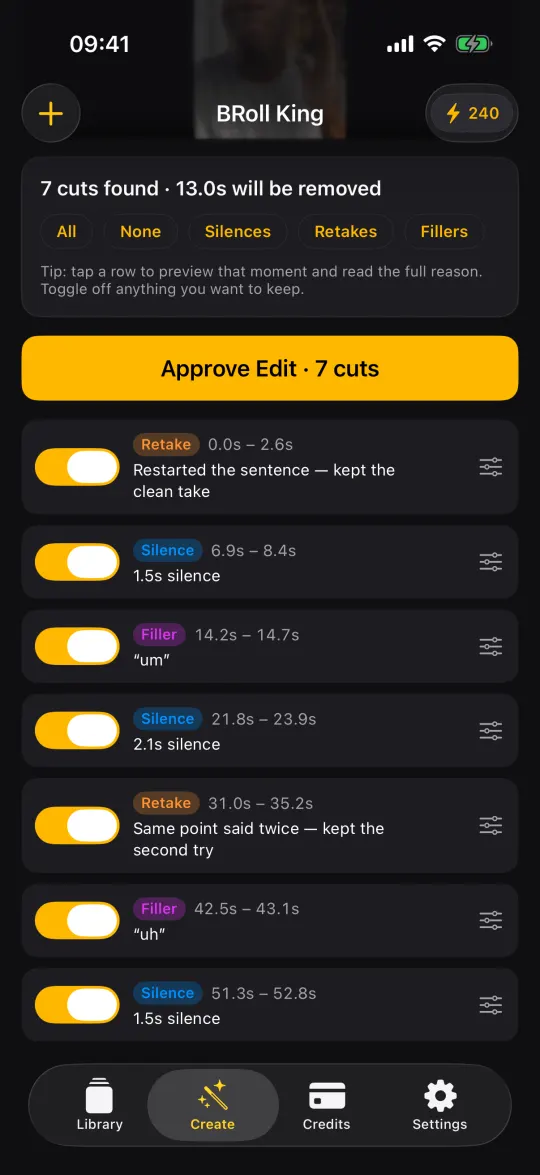
Silences are measured on the phone the moment you pick a video. The transcript then finds filler words ("um", "uh"), sentences you restarted, lines you said twice and off-script asides like "wait, let me say that again". Every proposed cut is listed with a label and a reason. Tap a row to preview it, switch off anything you want to keep, and fine-tune the rest on the timeline. Retake sensitivity has four levels; the default keeps your later take, and the AI retake review (on by default, 3 credits a minute, 10 minimum) also catches reworded retakes that word matching misses.
It plans the B-roll from what you said
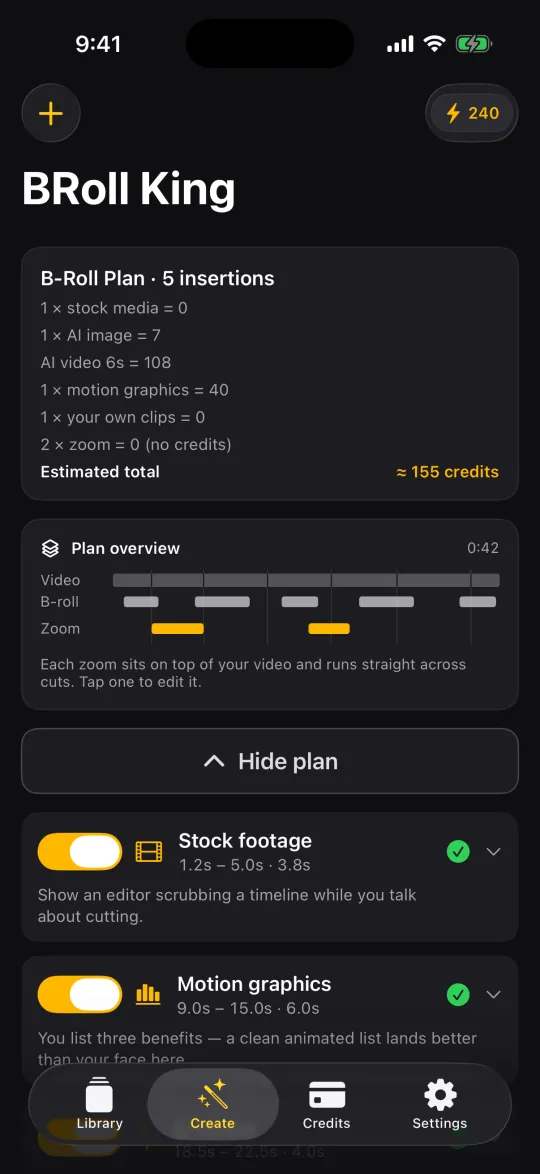
The transcript drives a plan of what to show, when and why: stock photos and footage from Pexels, AI images, AI video, animated motion graphics or your own clips. The first thing you see is the estimated credit cost, and a strip that lines up your video, the B-roll and the zooms. Any insert can be swapped to another source, re-prompted or deleted before anything is generated.
Zooms that land on your face
The plan suggests punch-ins and slow push-ins at key moments. On-device face detection aims them at you rather than the middle of the frame, each zoom is one smooth move even across cuts, and you can preview every zoom before you render. Zooms cost no credits.
Captions that get the names right
Captions are built from the word timings of the transcript. The AI caption review (on by default, 5 credits) fixes misheard names, brands and terms without rewriting what you said or moving the timing, and every change can be undone. You get 29 fonts and 18 animated styles; animated captions cost 10 credits per video.
Your full-resolution video stays on your phone
Cutting, compositing and rendering happen on the iPhone. Only the extracted audio is uploaded for transcription, and it is deleted when the job finishes. BRoll King doesn't add a watermark.
The same video in each app
Take a three-minute talking-head video with a few restarts, some dead air and a handful of moments that need something on screen.

In CapCut you import the clip and build the edit yourself: find and cut the pauses and false starts (or try Auto Cut, where it's available), decide which take of each line to keep, find or generate B-roll and place it on the timeline, keyframe any zooms, add captions and proofread them, then export. You have full control, and you do most of the finding.
In BRoll King you pick the video and review what it proposes: the cut list, then the B-roll plan with its cost, then the captions. You approve, the video renders on your phone, and you save it to Photos. A three-minute video with stock B-roll (3 stock photos and 1 stock clip) costs about 91 credits with the default settings, including the transcript, the plan, both AI reviews and animated captions — so the 250 free credits cover two of those, with credits left over.
Which one should you choose?
Choose CapCut if you want a free editor for many kinds of video, you rely on templates, effects and music, you want to edit on Android or a computer too, or you need something you can download today.
Choose BRoll King if most of your videos are you talking to the camera, you film on an iPhone, and the part you dread is the cleanup and the hunt for B-roll — not the creative polish.
Or use both. BRoll King exports a normal video file to your Photos library. Clean it up and illustrate it there, then open it in CapCut if you want to add a trend template or effects on top.
FAQ
Is there an app better than CapCut for talking-head videos?
It depends on the job. For templates, effects and trend edits, CapCut is hard to beat, and it is free to start. For talking-head videos, an app built for that format can do more of the work automatically: BRoll King finds silences, filler words, retakes and asides, plans B-roll from your transcript, adds face-aware zooms and captions, and you review each step.
Is BRoll King free?
It is free to start, not free forever. You get 250 free credits for your first 30 days, no card needed. After that, plans start at $19 a month. Zooms, the silence scan, cut review, timeline edits and rendering on your phone never use credits.
Does BRoll King add a watermark?
No. Videos you render with BRoll King don't carry a BRoll King watermark.
Can I use BRoll King and CapCut together?
Yes. BRoll King saves a normal video file to your Photos library, so you can open it in CapCut, or any other editor, and keep going.
Is BRoll King available on Android or desktop?
Not yet. BRoll King is an iPhone app (iOS 17 or later), and a web version is in development. CapCut already runs on Android, Windows, Mac and the web.
When can I download BRoll King?
It is coming to the App Store. Join the list on the iPhone app page and you will get one email the day it launches.
Sources
Competitor details were checked on September 29, 2026 on these pages. Apps change prices and features often — check the developer's own page before you decide.
- App Store (US) — CapCut: Video Editor (price, in-app purchases, features)
- CapCut Help — how much CapCut Pro costs (varies by region, device and promotion)
- CapCut Help — removing the watermark when exporting
- CapCut Help — exporting projects that use Pro items
- CapCut Help — auto captions
- CapCut Help — Standard vs Pro
- CapCut — desktop editor and AI tools
- CapCut — Remove Filler Words tool
- CapCut Help — Auto Cut on mobile
CapCut is a trademark of its owner. iPhone and App Store are trademarks of Apple Inc. Other product names are trademarks of their respective owners. BRoll King is independent and not affiliated with, sponsored by or endorsed by CapCut or its owners. CapCut details were checked on September 29, 2026 against CapCut's own pages and its App Store listing — check them for current pricing and features.