Do you need to be a professional to edit good videos?
No. Most of what makes a video feel professional comes from a handful of decisions you can learn in an afternoon — and from avoiding a few common mistakes. Here is what matters, what doesn't, and which parts you can now hand to software.
TL;DR
- No. Viewers judge a video by whether it is clear, well paced and easy to hear — not by the software or the editor's résumé.
- Seven edits do most of the work: start with the point, cut dead air and false starts, fix the audio, show what you talk about, add a little emphasis, caption it, and end cleanly.
- Professionals are faster and have better taste in the hard parts — story, pacing, sound and restraint. You build that by editing often, not by buying gear.
- The tedious parts can be automated now: finding pauses and retakes, captions, even a first B-roll plan. Your job is to review and decide.
In this article
What viewers actually judge
Nobody watching your video knows which app you used, and very few people can tell an expensive camera from a recent phone. What they feel, within seconds, is friction: a slow start, a long pause, a sentence that begins three times, audio that sounds like it was recorded in a bathroom, captions that cover your face.
Remove the friction and a video reads as professional, even if it was shot and edited on a phone. That is good news, because friction is much easier to remove than talent is to acquire. Most of it is mechanical.
Seven edits that make any video look professional
1. Start with the point
Cut the warm-up. "Hey everyone, so today I wanted to talk about…" is where many self-recorded videos lose people. Start on the first sentence that says something specific — a claim, a question, a result — and move the greeting later or drop it.
2. Remove dead air and false starts
When you record yourself you pause to think, restart sentences and say the same line twice until it sounds right. That is normal while filming and painful to watch. Cut silences longer than a beat, keep the best take of each repeated line (usually the last one) and delete asides like "wait, let me do that again".
Don't cut every breath, though. A video with no pauses at all feels breathless. Leave short, natural gaps between thoughts; remove the ones where nothing is happening.
3. Fix the audio before anything else
People forgive soft focus; they don't forgive words they can't make out. A clip-on microphone close to your mouth does more for a talking-head video than any camera upgrade. Record in a room with soft surfaces (curtains, a sofa, a rug), keep the level steady, and keep music low enough that every word stays clear.
4. Show what you're talking about
B-roll — the footage, images and graphics that cut away from your face — does two jobs. It illustrates what you say, and it hides the jump cuts you made in step 2. A simple rule: whenever you mention something a viewer could see (a place, a product, a number, a before-and-after), show it. Keep each insert short enough that it supports the sentence instead of replacing it.
5. Add emphasis, sparingly
A slow push-in during a personal story or a quick punch-in on the key line gives a one-camera video some of the rhythm of a multi-camera shoot, and it smooths over cuts. Save zooms for the moments that matter — the claim, the punchline, the turn in the story. Zooming on every sentence makes them meaningless.
6. Caption it, and proofread the names
Captions help people who watch without sound and make your video accessible to viewers who are deaf or hard of hearing. Automatic captions are good now, but they still mishear names, brands and jargon — exactly the words that make you look careless when they are wrong. Read every caption with a proper noun in it before you export. Our guide to the best caption apps for iPhone covers the options, free ones included.
7. End when you're done
Say the one thing you want people to do next and stop. Long outros and repeated summaries add time without adding anything.
What professionals do better (and how to catch up)
Professional editors aren't magic, but they are better at four things that take time to learn:
- Story. They know what the video is about before they cut. Write the one-sentence point of your video before you open an editor; anything that doesn't serve it is a candidate for deletion.
- Pacing by feel. They watch the edit back at full speed and notice where their own attention drifts. Do the same — once with sound, once muted — and cut wherever you get bored.
- Consistency. One caption style, one or two fonts, the same framing and the same kind of zoom from video to video. Consistency reads as intent.
- Restraint. Fewer transitions, fewer effects, fewer fonts. Many flashy effects in beginner edits are there because the app offered them, not because the video needed them.
The fastest way to build these skills isn't a course; it's volume. Edit short videos often, compare them with videos you admire in your niche, and check where viewers drop off in your platform's analytics. Each drop-off point is a free editing lesson.
What you can hand off to software now
A lot of editing time goes into finding things rather than deciding things. Finding is exactly what software is good at.

| Task | What it takes | What software can do |
|---|---|---|
| Finding silences and dead air | Time, not skill | Detect them automatically from loudness |
| Filler words, restarts, repeated lines | Patience | Detect them from a transcript; you confirm |
| Captions | Typing and timing | Transcribe with word timing; you proofread names |
| Choosing B-roll | Taste | Propose a plan from what you said; you swap what doesn't fit |
| Zooms for emphasis | A sense of rhythm | Suggest key moments and aim at your face; you preview |
| Story and structure | Judgment | Still yours |
The pattern: tools are great at finding and weak at deciding. The best ones show you what they found, explain why, and let you overrule them.
A simple beginner workflow on your phone
- Record in sections. If you flub a line, pause and restart the whole sentence instead of picking up mid-word. A clean restart is easy to find and cut later, by you or by software.
- Clean the A-roll first. The A-roll is the recording of you talking. Remove dead air, false starts and repeated lines before you add anything else — everything after depends on this timing.
- Add B-roll where the words are abstract. Numbers, places, products and comparisons are the natural spots.
- Add a few zooms on the lines that carry the video.
- Caption and proofread. Names, brands and technical terms first.
- Export and watch it once on your phone, the way your viewers will, before you post.
If you want the longer version of this workflow — and an honest look at what phones can't do yet — read Can you edit professional videos on a phone?
How BRoll King helps if you're not an editor
BRoll King is an iPhone app built around that workflow for talking-head videos. You pick a recording and it proposes the edit — and it shows its reasoning, which turns out to be a good way to learn what editors cut.
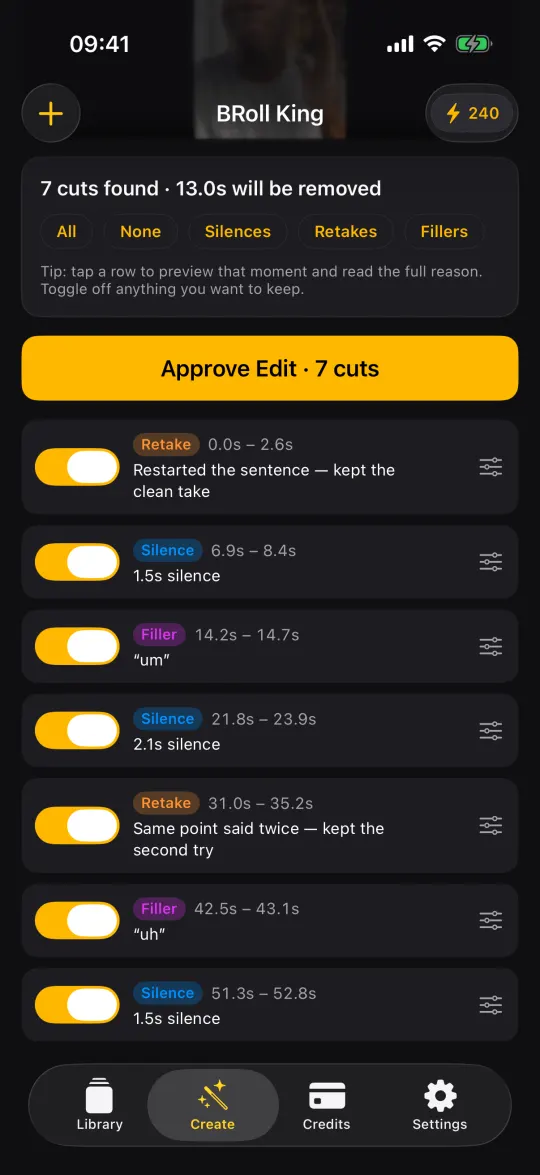
- A-roll cleanup you can check. Silences are measured on the phone; the transcript adds filler words, restarted sentences, lines said twice and off-script asides. You can switch off any cut or fine-tune it on the timeline, and your original recording is never changed.
- A B-roll plan from your own words. The plan says what to show, when and why — stock photos and footage from Pexels, AI images, AI video, motion graphics or your own clips — and shows the estimated credit cost before anything is generated. You can swap or delete any insert.
- Zooms and captions without the fiddly parts. Zooms are aimed at your face using on-device face detection, and the AI caption review fixes misheard names and brands without rewriting what you said.
What it isn't: a general-purpose creative editor with templates, transitions and effects. It is made for turning a recording of you talking into a clean, illustrated, captioned video. It isn't free either — transcription and AI generation use credits — but you can start with 250 free credits for your first 30 days, no card needed. Plans start at $19 a month.
FAQ
Can a beginner make good videos with just a phone?
Yes. A recent smartphone records more than enough quality for social and YouTube videos. The gap between a beginner's video and a good one is mostly editing decisions: a strong start, no dead air, clear audio, relevant visuals and readable captions. All of those can be done on a phone.
What should I learn first as a new video editor?
Cutting. Learn to remove pauses, false starts and repeated lines while keeping a natural rhythm, and learn to hear bad audio. Those two skills improve every video you make; effects and color grading matter far less for talking-head content.
Do I need expensive equipment to make professional-looking videos?
No. Soft light facing you (a window works) and a microphone close to your mouth make a bigger difference than a new camera. If you spend money, spend it on audio first.
Is using AI editing tools cheating?
No more than autofocus is. Professional editors rely on tools for tedious work too. What matters is that you review the result: keep the cuts that help, undo the ones that don't, and make the creative decisions yourself.
How do I know if my edit is good enough to post?
Watch it once on your phone at normal speed and once muted. Wherever your attention drifts, cut. If a muted viewer couldn't follow it, fix the captions or visuals. Then post it: viewers' drop-off points will teach you more than another hour of polishing.